
ChartMine puts eight tools and a set of alerts on one TradingView chart. This guide explains each module, the one rule that turns a signal into a valid entry, a checklist for lining the modules up, and step-by-step playbooks for 5-minute intraday and 4-hour swing trading. Every chart below is real NIFTY 50 data with the ChartMine rules applied.
- Read every section, in orderAbout 15 minutes. Each module builds on the last.
- Watch every animation to the endPress Slower on any you want to see again at your own pace.
- Open your own TradingView chartAbout 15 minutes. Find five past ChartMine signals on a symbol you follow and check each one against the rule and the checklist below.
- Paper trade before you risk moneyFollow the plan for a week or two on paper. Go live only when you trust the process.
The method in one minute
- Pick the timeframe for your style. 5 min for intraday trades closed the same day; 4 hour for swing trades and investing held for days or weeks.
- Wait for a signal. BUY / STRONG BUY or SELL / STRONG SELL, each with an entry, a stop loss and three targets.
- Wait for the confirmation candle. The signal is a valid entry only after one full candle in the signal's direction stays clear of the entry level: a green candle entirely above it (buy) or a red candle entirely below it (sell), 2–3 points away. The rule.
- Check that the modules agree: Market Pulse, VoluTrend, candle colours, trendlines and the Trend Analysis dashboard. The checklist.
- Manage the trade with the plan on the chart. Book part at TP1 and move the stop to entry, then aim for TP2 and TP3. Exit at the stop, on an opposite signal, or (intraday) by 15:15.
The chart at a glance
This is ChartMine on a live TradingView chart, followed by a NIFTY chart with every module labelled.
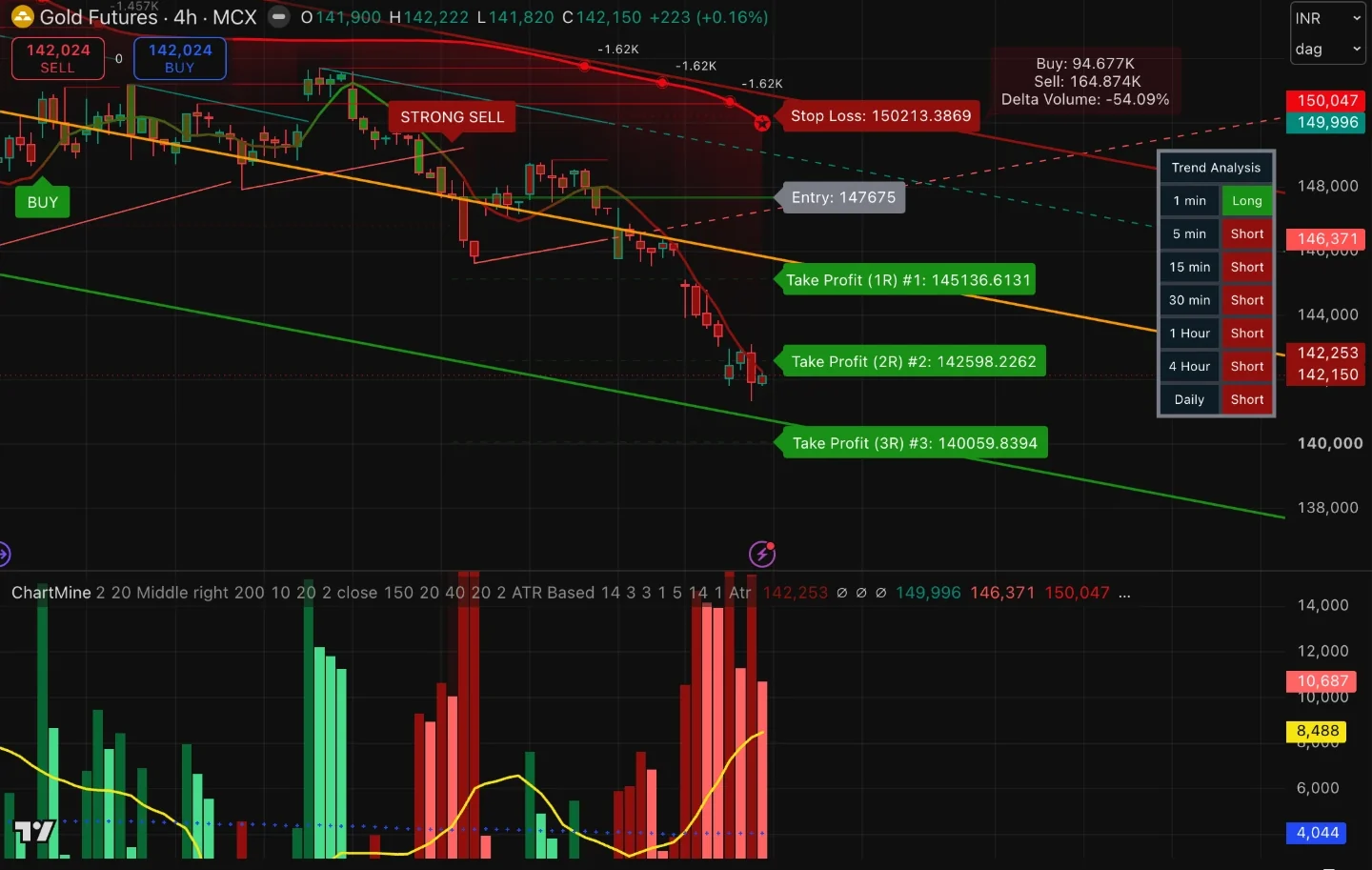
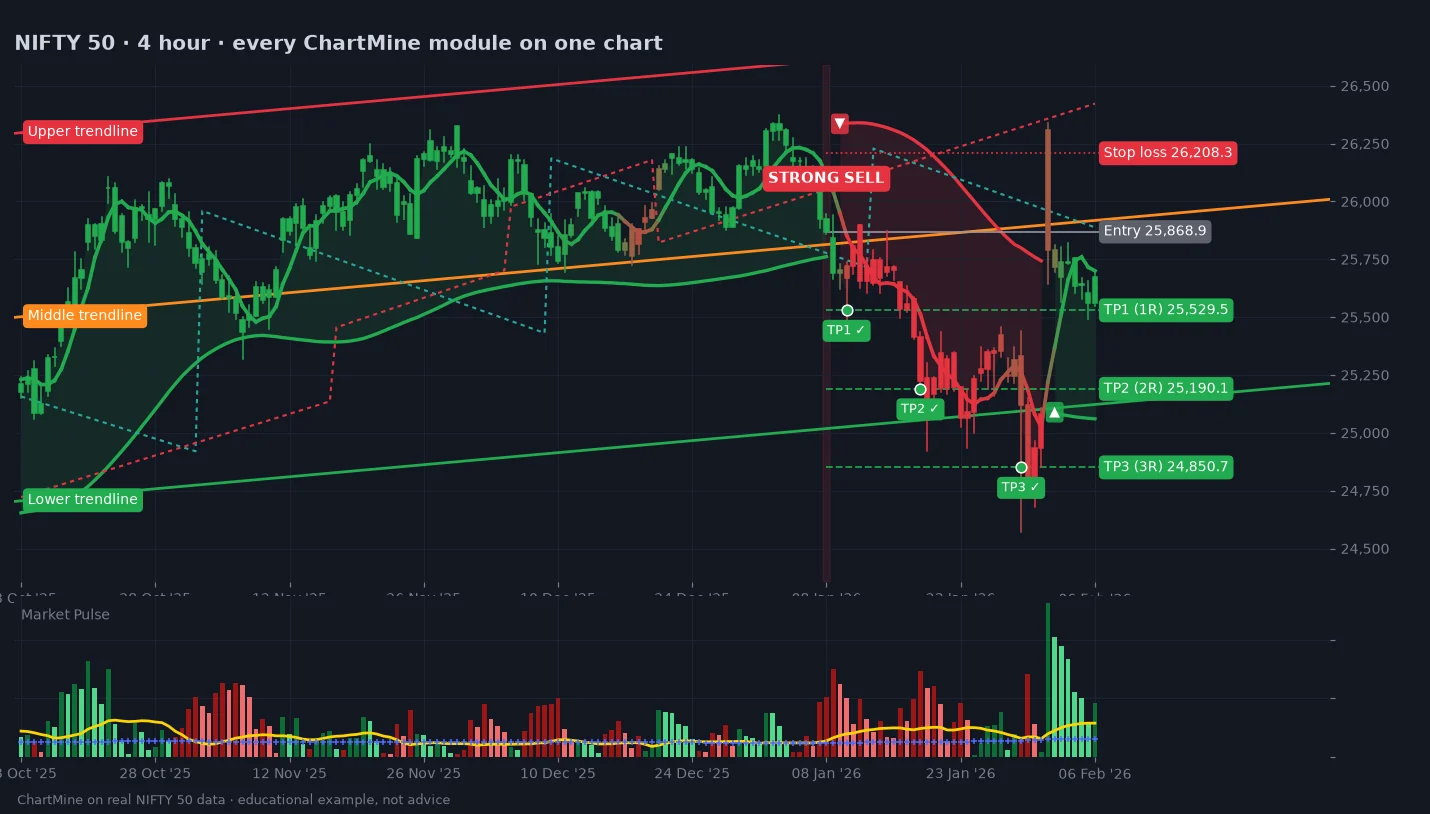
| What you see | Module | What it tells you |
|---|---|---|
| Thin line through the candles; candles coloured red to green | Trend Confirmation | The short-term trend and its strength |
| BUY / SELL labels, shaded candle | Signals | The trend has flipped; Strong = with the bigger trend |
| Entry, Stop Loss, Take Profit 1R / 2R / 3R | Trade plan | Where to get in, where you are wrong, where to take profit |
| Table: 1 min to Daily, Long / Short | Trend Analysis | The trend on seven timeframes at once |
| Three straight lines: red, orange, green | Auto trendlines | The 200-candle trend channel |
| Dotted teal and red sloping lines | TrendSnap | Break levels from recent swing highs and lows |
| Thick green or red curve, shading, ▲ ▼, volume box | VoluTrend | The main trend, a trailing level, who is in control |
| Lower panel: columns, yellow line, blue crosses | Market Pulse | Is there enough momentum to trade? |
1. Trend Confirmation line and candle colours
What it is. A fast, low-lag moving average of the candle midpoints that adjusts its own speed to how choppy the market is. ChartMine also recolours every candle, from red (the line is at the bottom of its recent range) through olive to green (at the top).
How to use it
- Green candles, rising line: buyers in control. Look only for buys.
- Red candles, falling line: sellers in control. Look only for sells.
- Olive or mixed colours: the trend is turning or flat. Wait for a signal and its confirmation.
- A buy while candles are still deep red (or a sell while they are bright green) fights the short-term trend.
Setting: Reactivity (default 20), under Momentum Line. Higher reacts faster but turns more often.
2. Buy and Sell signals
What they are. ChartMine runs a smoothed price filter. When price turns up through it after a down phase it prints a buy; when it turns down after an up phase, a sell. It then checks the bigger picture against a slower trend average:
| Label | Meaning | How to treat it |
|---|---|---|
| STRONG BUY | Short-term trend flipped up and price is above the slower trend average: the buy is with the bigger trend. The candle is shaded green. | The preferred buy. |
| BUY | Flipped up while price is still below the slower average: a buy against the bigger trend, often a bounce. | Smaller size, or skip unless everything else agrees. |
| STRONG SELL | Flipped down and price is below the slower trend average. Candle shaded red. | The preferred sell. |
| SELL | Flipped down while still above the slower average: a sell against the bigger trend. | Smaller size, or skip unless everything else agrees. |
Setting: Speed (default 2), under Trade Signals. Lower = more, earlier, noisier signals; higher = fewer, later, cleaner.
3. Entry, stop loss and three targets
Every signal comes with a complete plan, drawn to the right of price:
- Entry the close of the signal candle.
- Stop Loss where the trade is wrong. Default 3 × ATR(14) from entry, so it widens in volatile markets and tightens in calm ones. You can switch to a fixed %, a % trailing stop, or the recent swing high/low.
- Take Profit 1R, 2R, 3R one, two and three times the risk. With a 90-point stop, TP1 is 90 points away, TP2 180 and TP3 270.
When you enter on the confirmation candle your price differs a little from the Entry label; keep the stop and targets exactly as drawn.
Settings (Stop-Loss): Show RR, Stop-loss Type (ATR Based, % Based, % Trailing, Swing High/Low), ATR Period 14, ATR Multiplier 3.0, Stop-Loss % 3.0, Trailing % 1.0, Swing H/L Lookback 5.
4. Trend Analysis dashboard
What it is. For each timeframe from 1 minute to Daily, the cell shows Long when price is above that timeframe's 200-period EMA and Short when below. It updates live whatever timeframe your chart is on.
How to use it
- Intraday on 5 min: watch the 15 min and 1 Hour rows. Buys when they say Long, sells when they say Short.
- Swing on 4 hour: watch the 4 Hour and Daily rows.
- All rows one colour: a strong one-way market. A mix: a range or a turning point; smaller size, quicker profits.
Settings: Show Timeframe Dashboard, Dashboard Location (default Middle right).
5. Auto trendlines
What it is. ChartMine fits a straight trend line through the last 200 closes (the middle line) and draws the upper and lower lines two average deviations either side. It is redrawn on every candle, so it always describes the current trend.
How to use it
- Slope: a rising channel favours buys, a falling one favours sells.
- Room to run: buying right under the upper line, or selling right on the lower line, leaves little room to the targets. Prefer buys from the middle or lower half, sells from the middle or upper half.
- The middle line often acts as support in an uptrend and resistance in a downtrend; a close through it is an early sign of change.
- Outside the channel: stretched. Expect a pause or a snap back.
Settings: Trendlines on/off, Trendline Lookback (default 200).
6. TrendSnap break levels
What it is. TrendSnap finds swing highs and lows (14 candles either side) and projects a sloping level from each: the upper level falls from the last swing high, the lower level rises from the last swing low, at a pace set by recent volatility (ATR). A close above the upper level is an Upper Break; a close below the lower level, a Lower Break.
How to use it
- Confirmation: a BUY followed by an Upper Break (or a SELL with a Lower Break) shows price escaping its recent range.
- Early warning: holding a buy and price closes below the red dotted level? The swing structure has broken: tighten the stop or book profit.
- Not every break follows through. Breaks in the direction of VoluTrend and the dashboard are the ones worth acting on.
Settings (Dynamic TrendSnap): Analysis Period 14, Momentum 1, Calculation Type Atr / Stdev / Linreg, Historical, Project Levels.
7. VoluTrend
What it is. VoluTrend is ChartMine's main trend filter. It starts from an adaptive moving average (VIDYA) that speeds up when price moves with conviction and slows down in chop, and draws bands two long-term ATRs above and below it.
- A candle closing above the upper band turns the trend up: a ▲ appears and the green line is drawn below price.
- A candle closing below the lower band turns it down: a ▼ appears and the red line is drawn above price.
- Price has to travel the whole band to flip it, so VoluTrend ignores small wiggles and shows the main direction.
The volume readings
- Buy / Sell / Delta Volume box: volume on up-candles (Buy) and down-candles (Sell) since the current trend began, and the difference in %. On the Gold chart above, Buy 94.7K against Sell 164.9K gives Delta Volume −54%: sellers clearly in control. A delta fading towards 0 while price still trends warns that the move is tiring.
- Short lines with numbers (like −1.62K): swing highs in a downtrend, or swing lows in an uptrend, where volume gathered. When the VoluTrend line moves through one, it is labelled with that swing's average volume; negative numbers belong to downtrends.
How to use it
- Trade only in its direction: buys with a green line under price, sells with a red line over price.
- Trail the last part of a position with the line after TP1 or TP2.
- A flip against your trade is a reason to exit what is left.
Settings (VoluTrend): Length 10, Momentum 20, Distance factor for bands 2, Source close, colours, Shadow.
8. Market Pulse
What it is. Market Pulse (the lower panel) shows whether a move has power behind it. Each column is the change in a fast-versus-slow moving-average gap, scaled up.
| Element | Meaning |
|---|---|
| Green column | Upward momentum. Dark green: growing. Light green: still upward, but cooling. |
| Red column | Downward momentum. Dark red: growing. Light red: still downward, but cooling. |
| Explosion line | How wide the market's normal swings are right now (Bollinger Band width). A column taller than it means momentum is beating normal noise. |
| Dead zone | A floor from the average range of the last 100 candles. Columns below it mean the market is too quiet to trade. |
How to use it
- For a buy: a green column above the Explosion line and the Dead zone. Dark or light green both work: light green means the push has cooled but the trend is still continuing.
- For a sell: a red column above both lines.
- Wait when columns sit below the Dead zone, or the colour is against your trade.
- In a trade: columns dropping below the Explosion line, or changing colour, mean the move is running out of steam. Consider booking profit.
Settings (Market Pulse): Sensitivity 150, FastEMA 20, SlowEMA 40, BB Channel 20, BB Stdev Multiplier 2.0.
9. Alerts
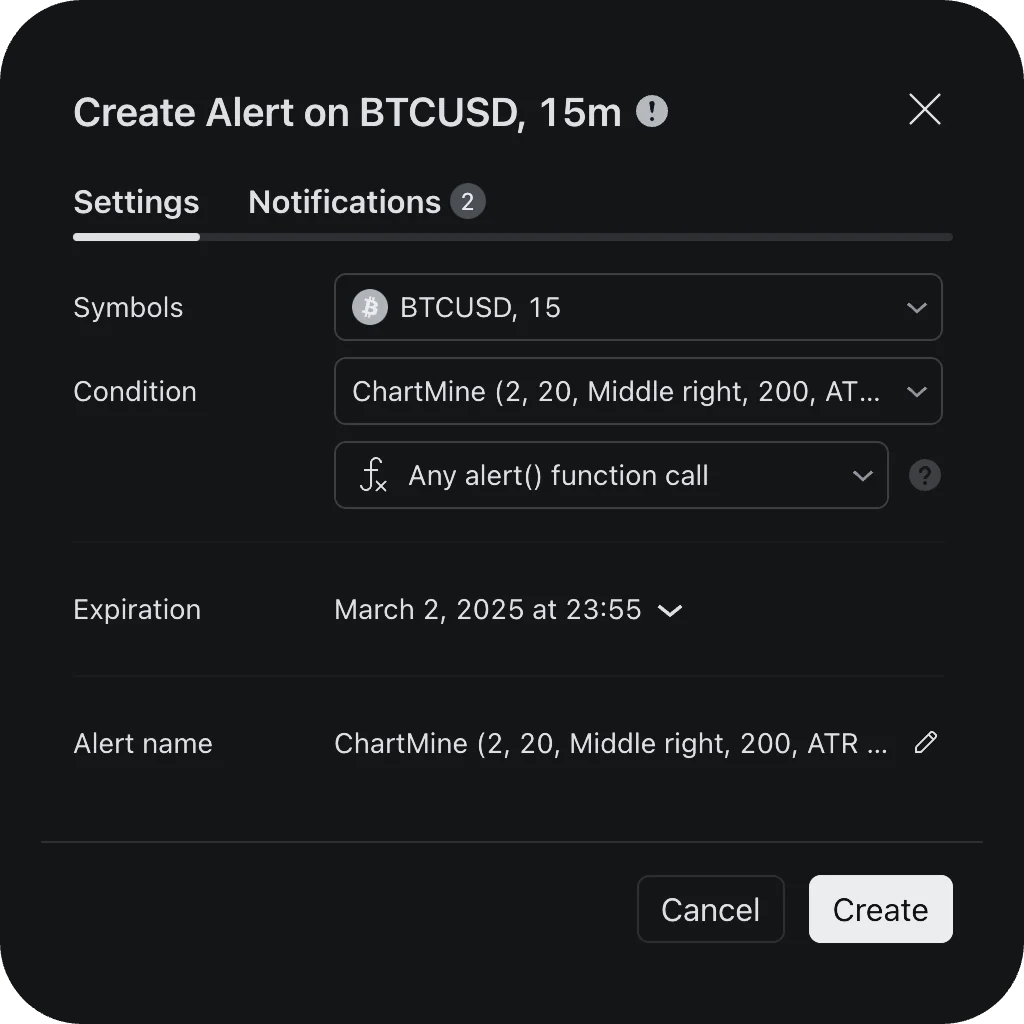
ChartMine alerts arrive through TradingView: app push, pop-up, email, or webhook on paid plans.
- Open the symbol and switch the chart to your trading timeframe (5 min or 4 hour). An alert keeps the timeframe it was created on.
- Click Alert. Condition: ChartMine → Any alert() function call. One alert covers every ChartMine event.
- Turn on Notify in app and install the TradingView app to get it on your phone.
- Repeat for each symbol you follow.
| Group | Alerts |
|---|---|
| Signals | Buy, Strong Buy, Sell, Strong Sell (sent when the candle closes) |
| Trade plan | Stop loss hit; TP1, TP2, TP3 reached |
| TrendSnap | Upper Break, Lower Break |
A signal alert is a cue to look at the chart, not to click buy: the confirmation candle and the checklist still apply.
The confirmation-candle rule
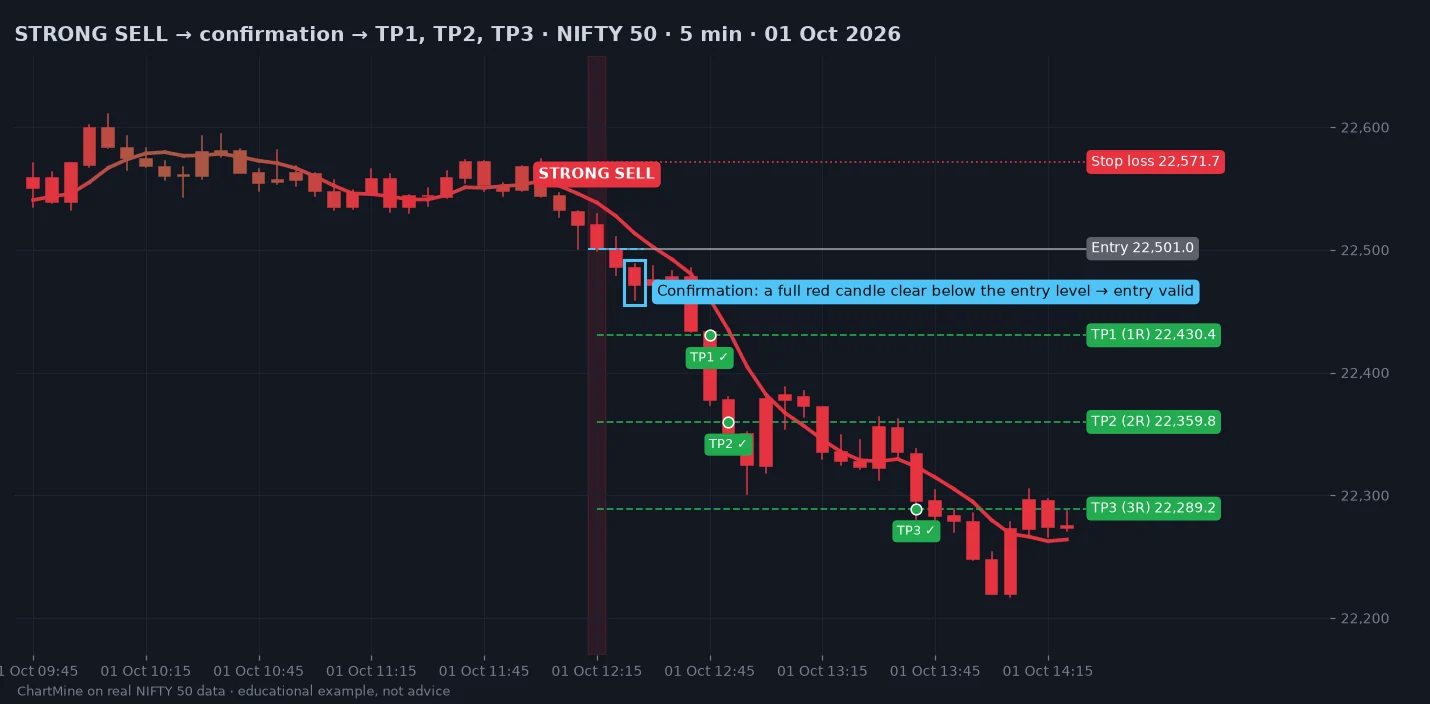
A signal becomes a valid entry only when one full candle in the signal's direction stays completely clear of the entry level. The entry level is the Entry label ChartMine draws: the close of the signal candle.
- BUY valid when a bullish (green) candle forms entirely above the entry level: its low stays at least 2–3 points above it and never touches it.
- SELL valid when a bearish (red) candle forms entirely below the entry level: its high stays at least 2–3 points below it and never touches it.
- A candle that closes beyond the entry but touched it on the way does not count. Keep waiting.
- Enter at the close of that confirmation candle; keep the stop and targets as drawn.
- No confirmation within the next 3 candles, or an opposite signal first? Skip it.
Many signals that fail, fail straight away. Waiting for one full candle that never comes back to the entry level filters out a large share of them, at the cost of a slightly later entry.
The alignment checklist
The best trades are the ones where the modules agree. Before entering on a confirmed signal, run down the list: the more boxes that tick, the more conviction (and size) the trade deserves.
For a BUY
- Signal: STRONG BUY (a plain BUY needs everything else to agree).
- Confirmation: a full green candle formed clear above the entry level (2–3 points, never touching it).
- Market Pulse: a green column (dark or light) above the Explosion line and the Dead zone.
- VoluTrend: green, line below price.
- Candles and Trend Confirmation line: green.
- Trendlines: room above; price not pressing the upper line.
- Trend Analysis: the next timeframe up says Long (15 min / 1 Hour for 5-min trades; Daily for 4-hour trades).
For a SELL
- Signal: STRONG SELL (a plain SELL needs everything else to agree).
- Confirmation: a full red candle formed clear below the entry level (2–3 points, never touching it).
- Market Pulse: a red column (dark or light) above the Explosion line and the Dead zone.
- VoluTrend: red, line above price.
- Candles and Trend Confirmation line: red.
- Trendlines: room below; price not sitting on the lower line.
- Trend Analysis: the next timeframe up says Short.
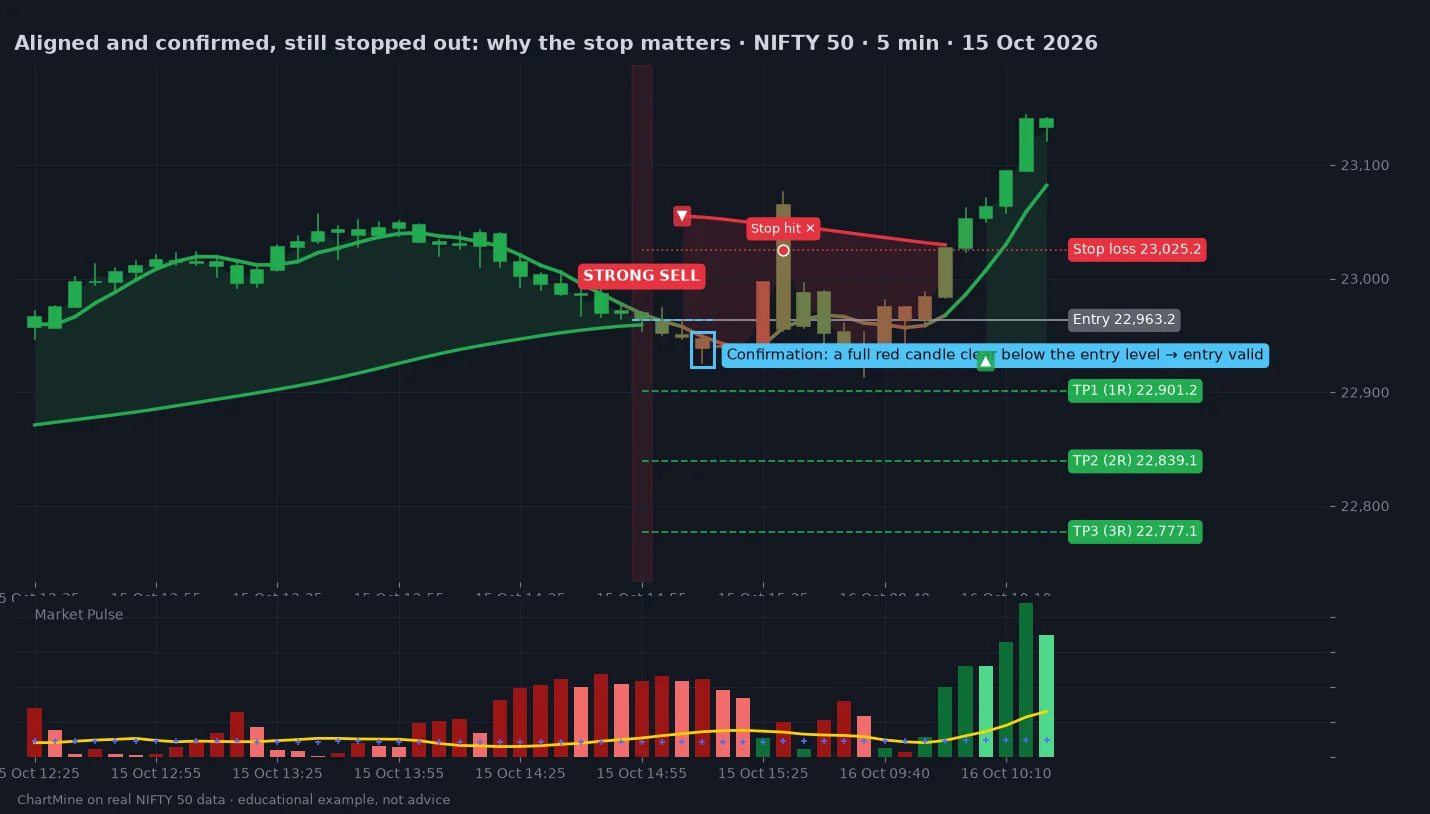
Intraday: the 5-minute playbook
For trades opened and closed the same day: index options and futures, intraday stocks.
- Before 09:15 open the 5-minute chart. Note the dashboard's 15 min and 1 Hour rows and the VoluTrend colour: that is your bias for the day.
- Take extra care in the first 15 minutes. Opening candles are wide and gaps distort the levels.
- Signal → confirmation → checklist. Enter on the close of the confirmation candle.
- Place the stop at the ChartMine stop loss straight away.
- At TP1 book part (for example half) and move the stop to your entry.
- At TP2 book more; trail the rest with the VoluTrend line towards TP3.
- Exit everything by 15:15, whatever the targets say. Intraday trades do not stay overnight.
- Stop for the day after two losing trades in a row.
Trading options on a 5-minute signal? Use the index chart for the signal and the plan. Option premiums move faster, so size by the premium you can afford to lose, not by the number of lots.
Swing and investing: the 4-hour playbook
For trades held from a few days to a few weeks: stocks, index futures, longer-dated options.
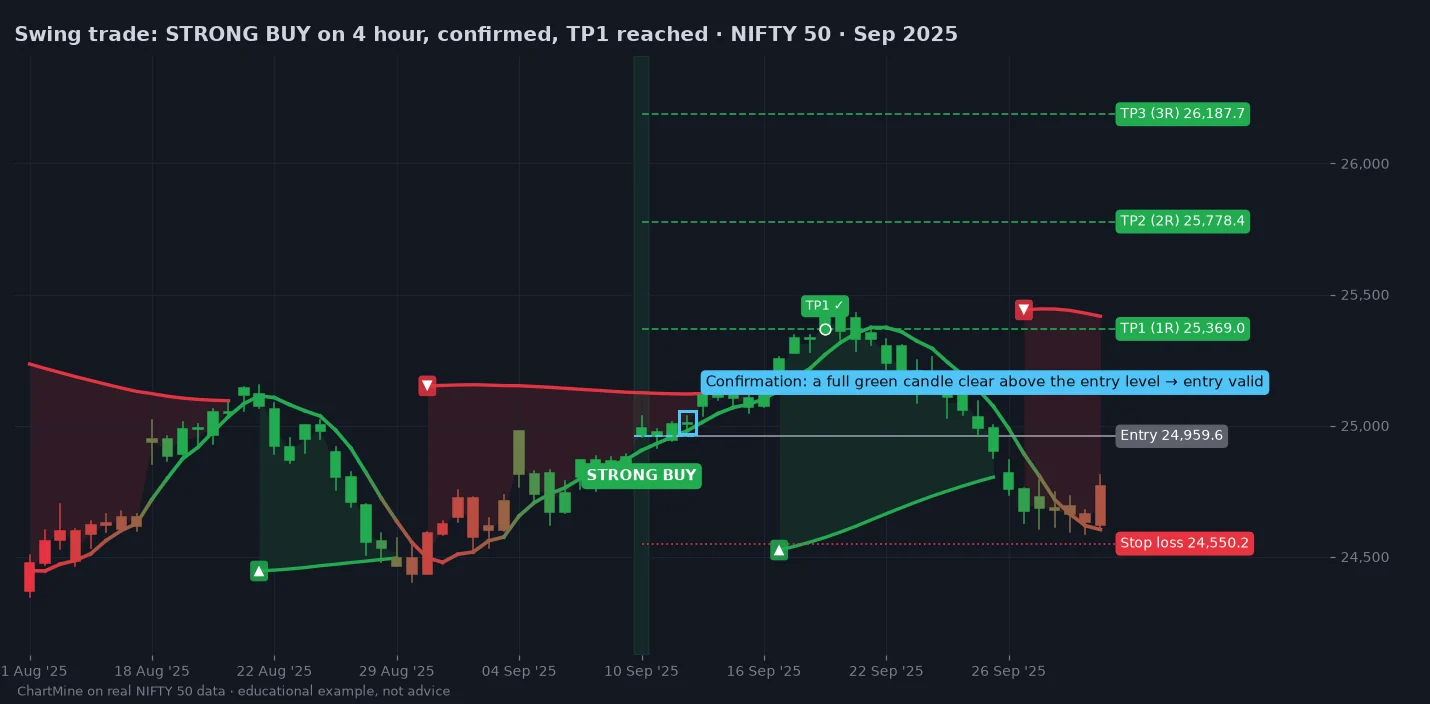
- Check the big picture first: the 4 Hour and Daily rows of the dashboard, the slope of the trend channel, and the VoluTrend colour.
- Signal → confirmation → checklist, as for intraday, on 4-hour candles.
- Expect a wider stop. A 4-hour stop is several times wider than a 5-minute one, so trade a smaller quantity for the same rupee risk.
- Gaps: overnight and weekend gaps can open beyond your stop. Keep size modest enough that a gap is survivable.
- Book TP1, then let the rest run with the stop at entry, trailed under (buys) or over (sells) the VoluTrend line.
- Review after each 4-hour candle closes (around 13:15 and 15:30 for NSE). No need to watch every tick.
Managing an open trade
| What happens | What to do |
|---|---|
| TP1 reached | Book part; move the stop to entry. |
| TP2 reached | Book more; trail the rest with the VoluTrend line. |
| TP3 reached | Close the trade and wait for the next signal. |
| Stop loss hit | Close. A known, limited loss: the plan worked as designed. |
| Opposite signal | Close what is left. Don't flip direction until the new signal confirms. |
| VoluTrend flips against you | Close what is left. |
| Market Pulse fades below the Explosion line or changes colour | The move is losing energy: tighten the stop or book profit. |
| Close through a TrendSnap level against you | The swing structure broke: tighten the stop. |
| 15:15 on an intraday trade | Close everything. |
Risk and position size
- Risk a small, fixed share of capital per trade: typically 1%, never more than 2%. With ₹5,00,000 and 1% risk, one trade may lose at most ₹5,000.
- Size from the stop: quantity = rupees at risk ÷ (entry − stop). A 90-point stop with ₹5,000 at risk, on an instrument that moves ₹1 per point per unit, means about 55 units.
- Use the free position size calculator.
- Targets at 1R, 2R and 3R mean you can be profitable even when fewer than half the trades win, as long as every loss is kept to 1R.
Common mistakes
- Entering the moment a signal prints instead of waiting for the confirmation candle.
- Taking plain BUY / SELL signals against VoluTrend and the dashboard.
- Buying when Market Pulse is below the Dead zone: no energy, no follow-through.
- Moving the stop further away "to give it room". The stop is the plan.
- Holding an intraday trade overnight because it is "nearly at target".
- Switching timeframes mid-trade to find a reason to stay in.
- Trading every symbol at once instead of a short watchlist you know well.
Settings reference
The examples in this guide use the defaults. Change one thing at a time and judge it over many trades, not one.
| Group | Setting | Default | What it changes |
|---|---|---|---|
| Trade Signals | Speed | 2 | Signal sensitivity: lower = more, earlier signals |
| Momentum Line | Reactivity | 20 | How fast the Trend Confirmation line reacts |
| Dashboard | Show · Location | On · Middle right | The Trend Analysis table |
| Trendlines | Trendlines · Lookback | On · 200 | The trend channel and how many candles it covers |
| VoluTrend | Length · Momentum · Distance · Source | 10 · 20 · 2 · close | VoluTrend speed and how far price must travel to flip it |
| Market Pulse | Sensitivity · Fast · Slow · BB Channel · BB Stdev | 150 · 20 · 40 · 20 · 2.0 | Column scale and the Explosion line |
| RR | Show RR | On | Entry, stop and target labels |
| Stop-Loss | Type · ATR Period · ATR Multiplier | ATR Based · 14 · 3.0 | Where the stop goes |
| Stop-Loss | Stop % · Trailing % · Swing Lookback | 3.0 · 1.0 · 5 | Used only with those stop types |
| TrendSnap | Analysis Period · Momentum · Type | 14 · 1 · Atr | Swing size and how steeply levels slope |
| TrendSnap | Historical · Project Levels | On · On | Show past levels; extend the current ones |
Finished reading? Now practise. Open TradingView, scroll back through a chart you know, and find ChartMine signals. For each one, ask: did a full candle confirm it? How many of the seven checks agreed? Where did the stop and targets sit? Twenty minutes of this on real charts teaches more than any guide.
Questions
When is a ChartMine buy or sell signal a valid entry?
Only after one full candle in the signal's direction stays completely clear of the entry level: a green candle entirely above it for a buy, a red candle entirely below it for a sell, at least 2–3 points away and never touching it. The entry level is the signal candle's close (the Entry label). If that does not happen within the next three candles, or an opposite signal appears first, skip the signal.
Which timeframe should I use with ChartMine?
The 5-minute chart for intraday trades closed the same day, and the 4-hour chart for swing trades and investing held for days or weeks. Use the Trend Analysis dashboard to check the next timeframe up.
What is the difference between BUY and STRONG BUY?
Both mean the short-term trend flipped up. STRONG BUY also has price above the slower trend average, so it trades with the bigger trend; a plain BUY is against it and needs the other modules to agree.
What does VoluTrend show?
VoluTrend is ChartMine's main trend filter: a green line below price in an uptrend, a red line above price in a downtrend, ▲ and ▼ at each flip, and a box with buy volume, sell volume and delta volume since the trend began.
How do I read Market Pulse?
Green columns are upward momentum and red columns downward momentum; dark means growing, light means cooling. Trade when a column in your direction stands above both the yellow Explosion line and the blue Dead zone.
Where should I put the stop loss and targets?
Use the levels ChartMine draws: a stop at 3 × ATR by default and targets at one, two and three times the risk. Book part at TP1 and move the stop to entry.
ChartMine is a technical-analysis tool for education and research. Nothing in this guide is investment advice or a recommendation to buy or sell any security. The examples are historical NIFTY 50 data shown to explain how the indicator works; past behaviour does not guarantee future results. Trading in equities, futures and options carries a substantial risk of loss. Use a stop loss, size positions you can afford to lose, and consult a SEBI-registered adviser for personal advice.